When a choice has several branches and each branch has its own risks, a decision tree template helps you see the whole problem on one page instead of juggling it in your head. This page shows 6 free decision tree previews, from plain layouts to spreadsheet-style diagrams, and a single ZIP download at the bottom of the gallery that holds the editable files. Use them to compare options for a project, a purchase, a hiring plan or a classroom exercise.
When to Use a Decision Tree
Use a decision tree when a choice has several branches and each has its own cost, risk or probability: whether to launch a product, hire or outsource, choose a supplier, or work through a troubleshooting path. It suits managers, students, analysts and teams who want the reasoning visible on one page.
What Is Included in These Templates
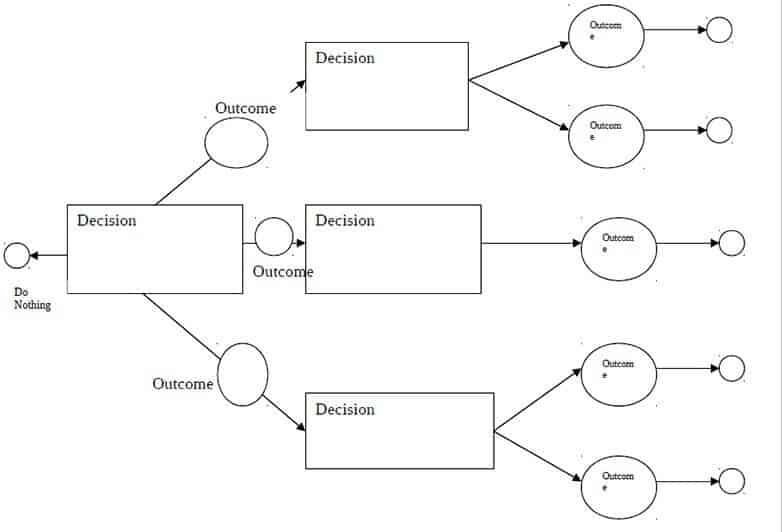
- Decision node: the starting question or choice, usually a square.
- Chance nodes: uncertain outcomes with probabilities, usually circles.
- Branches: lines labelled with options or events.
- End nodes: final outcomes with payoffs or values.
- Spreadsheet-style versions: cells for calculating expected values.
How to Fill Out a Decision Tree
- State the decision in one question at the root.
- Draw a branch for each option and add the possible outcomes beneath.
- Assign probabilities to chance outcomes so they add to 100% at each node.
- Enter costs or payoffs at each end node.
- Calculate expected value for each path and choose the best, noting your assumptions.
Key Points to Check
- Probabilities that sum to 100% at every chance node.
- Consistent units: money, time or points, not mixed.
- Complete options: do not leave out a realistic branch.
- Realistic estimates: document where numbers come from.
- Readable size: avoid more than three levels on a page.
Tips
- Start on paper, then recreate it in the template.
- Color the best path so readers see it first.
- Revisit the tree when new information arrives.
About These Templates
These samples are published and maintained by Nick at Word Templates Docs, a free library of editable Word, Excel and PDF templates. If a link is broken or a file will not open, please contact us and we will fix it. Read more about how we prepare these templates.
Template file guide
Before completing your template
- Write the decision being made at the starting point.
- Label branches so readers can follow each path.
- Check that every path leads to a stated outcome.
Use the file links below to open an option directly, or continue to the previews to compare layouts. File formats are taken from the linked filenames. Extract ZIP archives before checking the files inside.
| File or resource | Format / source |
|---|---|
| decision tree templates ZIP | ZIP |
Free Decision Tree Template Previews



Download the Decision Tree Template Pack

Related Templates
- free instruction manual templates for step-by-step procedures
- free training manual templates for teaching a process
- free user manual templates for product guides
Frequently Asked Questions (FAQs) About Decision Tree Templates
What is the difference between a decision tree and a flowchart?
A flowchart shows the steps of a process. A decision tree centers on choices and uncertain events, often with values or probabilities attached so the outcomes can be compared.
What do the squares and circles mean?
By common convention a square is a decision you control and a circle is a chance event you do not. Lines connect them and the final outcomes sit at the ends.
How do I calculate the expected value of a branch?
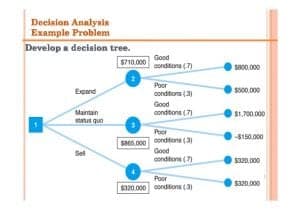
Multiply each outcome by its probability and add the results. For example, a 60 percent chance of 12,000 plus a 40 percent chance of minus 3,000 gives 6,000.
Where do probabilities come from?
From past records, market data or a reasoned estimate by the people who know the situation. Label them as estimates so nobody mistakes them for certainties.
How many branches are too many?
If the printed tree needs tiny type or several pages, it is probably too big. Trim unlikely options or split the problem into smaller trees.
Can I use a decision tree for a personal decision?
Yes. Renting or buying, choosing a course or comparing two job offers all fit, as long as you assign rough values to the outcomes that matter to you.
Are the previews linked to individual files?
No. On this page the previews are for viewing only, and the files are supplied together in the single ZIP download below the gallery.
Can I edit the files after extracting the ZIP?
Yes. Open each file with a program that supports its type, replace the sample content, and save your version under a new name so the original stays intact.


You must be logged in to post a comment.