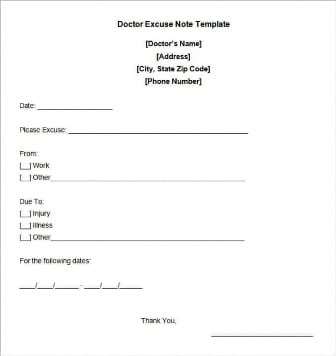
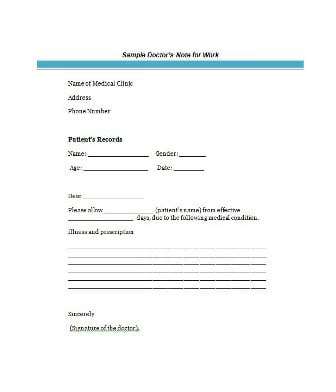
Looking for a free doctors note template you can edit and print? Below are four doctors note template samples for work and school, offered as free downloads: some open directly in Word (DOCX) and some arrive as ZIP files that you extract first. Use them as a guide to the layout and wording of a medical excuse note, and remember that a note only has value when a licensed healthcare provider has actually assessed the patient and signs it. To see more samples, you can also visit Download and use our samples on a related site.
What a Doctor’s Note Actually Says
A doctor’s note, also called a sick note, medical excuse, doctor’s excuse or fit note, is a short statement written by a doctor or other licensed provider. It confirms that a patient was seen and that a medical reason kept, or keeps, them from attending work or school. It usually gives the dates of absence, the expected return date and any restrictions, and it deliberately leaves out private details of the diagnosis.
That brevity is a feature. An employer’s HR team or a school attendance office needs to know that the absence was genuine and how long it lasts. It does not need to know the diagnosis, the treatment or anything from the patient’s medical record.
Fields a Doctors Note Template Should Include
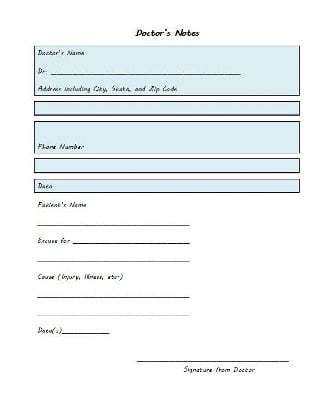
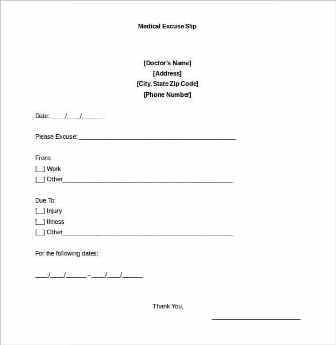
A good layout prompts the provider for every detail the reader will look for, so nothing has to be chased up by phone later. When you open a sample, check that it has space for each of these items:
- Clinic, hospital or practice name, address and phone number, ideally on letterhead
- The date the note is issued, which may differ from the date of the visit
- The patient’s full name, spelled the way the employer or school has it on file
- The date or dates the patient was seen or treated
- A plain statement such as “was seen in this clinic and advised to rest”
- Dates excused from work or school, plus the expected return date
- Any restrictions on return, such as light duties, no lifting, limited hours or no gym class
- The provider’s signature, printed name and license or stamp where required
- A contact number so the recipient can verify the note
Doctor’s Note for Work vs. Doctor’s Note for School
The two are built the same way but are read by different people, so the emphasis changes.
- For an employer: the reader is usually HR or a line manager. Focus on the dates the employee should be off, whether a phased return or modified duties are needed, and whether a follow-up note will be issued if the absence continues.
- For a school: the reader is a teacher or attendance officer. Name the student, give the days missed and mention any limits on physical education, exams or sports.
- Return-to-work or return-to-school notes: these confirm the person may go back, sometimes with conditions, and are worth issuing separately from the original excuse.
- Appointment verification: a very short note that only confirms attendance at an appointment on a given date and time.
How Providers Can Write a Doctor’s Note, Step by Step
- Start on official letterhead so the note is easy to trace back to the clinic.
- Confirm the patient’s identity and the visit date against your own records before writing anything.
- State the reason briefly. “Was seen and advised to rest” is normally enough. Add a diagnosis only when the patient consents and the recipient genuinely needs it.
- Give exact dates. Vague phrases like “a few days” cause disputes; write the first and last day excused.
- List restrictions in practical terms that a manager or teacher can act on.
- Sign and date it. An unsigned note is often rejected.
- Keep a copy following your local record-keeping rules, and hand the original to the patient or send it as instructed.
Short Example of Wording
To whom it may concern: Jordan Lee was seen at our clinic on 4 March and is advised to rest. Please excuse Jordan from work from 4 March to 6 March, with a return on 7 March. No restrictions apply on return. For verification, call the clinic on the number above. Signed, Dr. A. Patel, with license number.
Use Doctor’s Notes Honestly
A doctor’s note is only meaningful when a licensed healthcare provider who has actually assessed the patient issues it. These templates exist to help real providers write clear notes and to help people understand the expected format. Filling in a template and presenting it as if a doctor wrote it, or altering a genuine note, can be treated as forgery or fraud and can lead to serious consequences at work or school. If you are unwell, contact a doctor, clinic or telehealth service and ask for a note. Many clinics can issue one after an in-person or online consultation.
Mistakes to Avoid With Medical Excuse Notes
- Backdating a note to cover days the provider did not assess. Notes should reflect the actual visit.
- Including a full diagnosis when the employer only needs dates.
- Leaving out the return date, which leaves the recipient guessing.
- Forgetting the provider’s contact details, which makes verification impossible.
- Submitting late. Some employers and schools set a deadline after the absence.
- Ignoring your employer’s or school’s own policy on what a valid note must contain.
Free Doctors Note Template Samples to Download
Click any preview to see it at full size, then press the download button beneath it. Files ending in DOCX open in Microsoft Word; ZIP files should be extracted first. Replace the sample text with the clinic details, patient name and dates, then print the note for a handwritten signature or use your normal signing process. If you prefer to send a PDF, you can save the completed note as one from Word’s File menu.
Printable Doctors Note for Work
A printable doctor’s note for work is usually short and gives the dates of absence and the date the employee may return. The samples below show typical wording and layout, and you can adapt each one to your own letterhead.




Doctor’s Note for School Template
A doctor’s note for school tells teachers or administrators that a student was absent for a medical reason. It should include the student’s name, the dates missed and the provider’s signature. Parents should follow the school’s attendance policy about when a note is needed.


A Word on Online Doctor’s Note Makers
Online note makers can show how a note might be laid out, but a note only carries weight when a licensed healthcare provider issues and signs it. Use any online tool for formatting ideas only, and have the note reviewed and signed by the provider who treated you.
Related Templates
- free medical certificate templates
- salary certificate templates
- business memo templates
- letter of recommendation formats
Frequently Asked Questions About Doctors Note Templates
Who is allowed to sign a doctor’s note?
A licensed healthcare provider who has assessed the patient. A note that does not come from a real provider may be rejected and can cause serious problems.
Does a doctor’s note have to state my diagnosis?
Not normally. Most notes say only that the patient was seen and should be excused. Your privacy preferences and local rules decide how much detail is shared.
What should a doctor’s note for work contain?
The provider’s details, the employee’s name, the visit date, the dates of absence, the return date, any restrictions and a signature.
How far back can a note cover an absence?
That is up to the provider, who should only excuse days that reflect what they actually assessed. Ask for the note at the time of your visit so the dates are accurate.
Can an employer or school verify a note?
They may phone the clinic to confirm it is genuine, which is why accurate contact details matter.
What is a fit note or sick leave certificate?
It is a formal statement about fitness for work used in some countries. It is more structured than a simple excuse letter, so follow the format your local rules require.
Are these templates free, and what formats do they come in?
Yes, they are free downloads. Some are DOCX files that open in Word and some are ZIP files, which you should extract before use.
How do I get a doctor’s note if I am ill?
Contact your doctor, clinic or a telehealth service, explain that you need a note for work or school and follow their process. Check whether your employer or school has specific requirements first.