Need proof of income for a loan, rental or visa file? A salary certificate template gives an employer a ready-made letter that confirms a person’s job title and pay, so the HR team only has to fill in the details and sign. This page offers 6 free, editable salary certificate formats, including monthly, annual and employment-plus-salary versions. The downloads arrive as ZIP files, so extract them before you edit.
Salary Certificate, Payslip or Employment Letter?
These three documents are often confused. A payslip is a detailed record of one pay period, listing earnings and deductions. A salary certificate is a short letter, issued by the employer, that states the employee’s position and salary for a third party such as a bank. An employment verification letter focuses on dates and job title and may leave pay out. If the organization asking for proof has not said which one it wants, ask before you prepare it, because sending the wrong document is a common reason for delays.
Who Asks for a Salary Certificate and Why
- Banks and lenders: when an employee applies for a loan, mortgage, credit card or account.
- Landlords and property managers: to confirm a tenant can afford the rent.
- Embassies and immigration offices: for visa applications that ask for employment and income evidence. Each authority sets its own rules, so check its instructions.
- Schools and scholarship offices: to assess a family’s income.
- Other employers or partners: occasionally during background checks.
Choosing the Right Salary Certificate Format
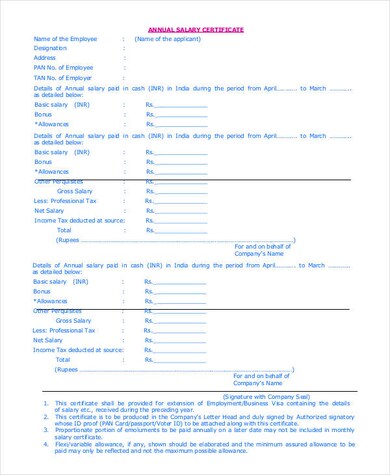
The six samples differ in tone and detail. A monthly format shows one month’s pay and suits rental applications. An annual format summarizes a full year and is useful for lenders who want a longer view. The employment and salary layout adds the joining date and position, which fits visa files. Simpler standard and professional designs work when the requesting party has no special requirements. Compare the previews below, pick the closest match, and cut any line the recipient did not ask for. Some links may open files hosted elsewhere, and a file name can differ slightly from its preview, so open the download and confirm it is the layout you wanted.
Fields to Fill In Before You Sign
- Company name, address and contact details on official letterhead.
- Date of issue and a reference number if your office uses them.
- The recipient’s name, or “To Whom It May Concern”.
- Employee full name, ID number, job title and date of joining.
- Basic salary, allowances, gross pay, deductions and net pay, exactly as recorded in payroll.
- The purpose, only if the employee requests it.
- Name, title and signature of the authorized signatory, plus a company stamp if that is your practice.
Sample Wording You Can Adapt
A short body paragraph might read: “This is to certify that Jordan Lee has been employed with Harbor Supplies Ltd. as a Senior Accountant since 1 March 2021. Jordan’s current monthly gross salary is 4,500, and this certificate is issued at the employee’s request for submission to the bank.” The names and figures here are invented, so replace them with verified records. Keep the language factual and avoid opinions about the employee’s character or future prospects.
Mistakes HR Teams Should Avoid
- Typing figures from memory instead of copying them from payroll.
- Issuing the letter without a date or an authorized signature.
- Including deductions or personal data the recipient did not need.
- Using an old template that still shows a former manager’s name.
- Forgetting to keep a copy on file.
These templates are general samples, not legal or financial advice. Employers remain responsible for the accuracy of the information they certify and for handling employee pay data according to their policies and local rules.
How to Prepare Your Salary Certificate Step by Step
- Confirm with the employee what the recipient needs and the deadline.
- Download and extract the ZIP file, then open the document in Word or a compatible editor.
- Paste your letterhead or add the company details.
- Enter the employee data and salary breakdown from payroll.
- Read the certificate aloud once to catch mistakes, then have the signatory review it.
- Print, sign and stamp it, or save a copy for your records before handing over the original.
Advice for Employees Requesting a Certificate
If you are the employee, make the request easy for HR to fulfil. Tell them exactly who will receive the letter, what the recipient asked for, and the date you need it by. Provide your full legal name as it appears on your application, since a mismatch between documents can cause questions. Ask whether you should receive a signed paper copy, a scanned copy or both, because some lenders and offices accept only originals. Check the certificate when you receive it: confirm your name, title, start date and pay figures are correct before you submit it anywhere. If your pay includes variable amounts such as bonuses or overtime, ask HR whether the letter should list them separately or show only the fixed salary, and follow what the receiving organization requires.
Related Templates
- free medical certificate templates
- letter of recommendation formats
- company letterhead templates
- memo templates and examples
Frequently Asked Questions (FAQs) About Salary Certificates
Who is allowed to sign a salary certificate?
Usually an HR manager, accountant or another person your company has authorized. The recipient may specify who must sign, so confirm this first.
Should a salary certificate show gross or net pay?
Many certificates show both, with allowances and deductions listed. Follow what the requesting bank, landlord or office asks for, and use payroll figures only.
How is a salary certificate different from a payslip?
A payslip covers one pay period in detail. A salary certificate is a short letter that confirms employment and pay for an outside party.
Can an employee write their own salary certificate?
The employer should issue it. A certificate written by the employee has little value to a bank or embassy because it is not an independent confirmation.
How recent should the certificate be?
Many organizations prefer one issued within the last month or two, but rules vary, so ask the recipient about their limit.
Do I need to print it on company letterhead?
Letterhead is common and helps the recipient see the document is official. If your company has none, include the full company name, address and contact details in the header.
What do I do with the ZIP files?
Extract them with your computer’s built-in tool, then open the document inside in Word or a compatible program and edit the sample text.
Is my employees’ pay information safe in these files?
The templates are blank. Once you add real data, store and share the finished certificate only as your company’s privacy and payroll policies allow.
Template file guide
Before completing your template
- State the pay period, currency and whether amounts are gross or net.
- Check employee details against the employer’s records.
- Use the employer’s authorized signature and issue date.
Use the file links below to open an option directly, or continue to the previews to compare layouts. File formats are taken from the linked filenames. Extract ZIP archives before checking the files inside.
| File or resource | Format / source |
|---|---|
| monthly salary certificate template | ZIP |
| printable salary certificate template | ZIP |
| standard salary certificate template | ZIP |
| annual employee salary certificate template | ZIP |
| employment and salary certificate template | ZIP |
| professional salary certificate template | ZIP |
Salary certificate template previews