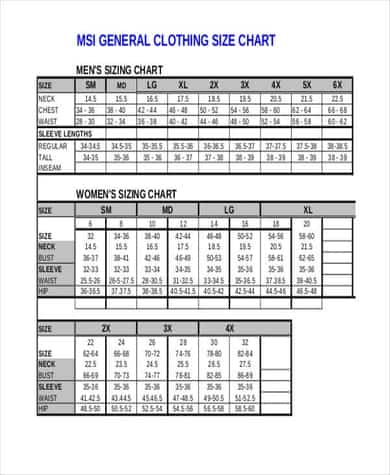
A good clothing size chart template turns a pile of tape-measure numbers into a table that customers, pattern cutters and buyers can actually read. This page offers 12 free, editable size chart templates covering apparel, gloves, kids’ clothing, shoes, rings, belts, diamonds, jeans, shirts and two full body measurement charts, plus six extra reference images you can study for layout ideas. Whether you sell dresses online, run a small sewing studio or just want to keep your own measurements on one printable sheet, start with the layout closest to your product and change the numbers.
What a Clothing Size Chart Template Should Contain
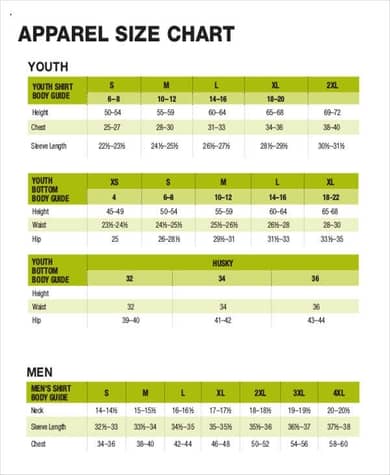
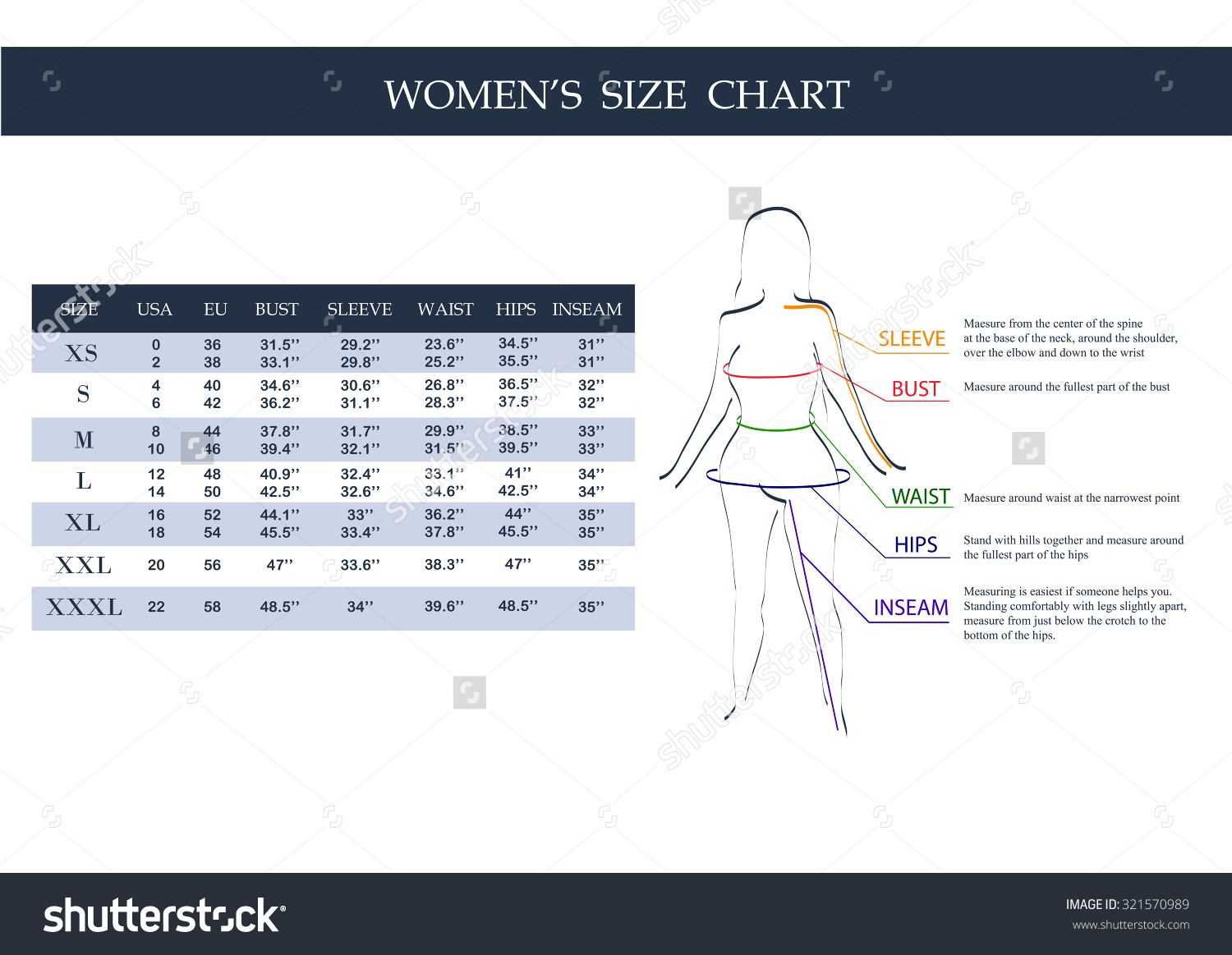
A clothing size chart (also called a size guide or sizing chart) links body measurements to the size labels printed on a garment. The best ones are short and unambiguous. Before you edit any template, decide which columns your product really needs:
- Size label: XS to XXL, numeric sizes, or age bands such as 4-5 years for children.
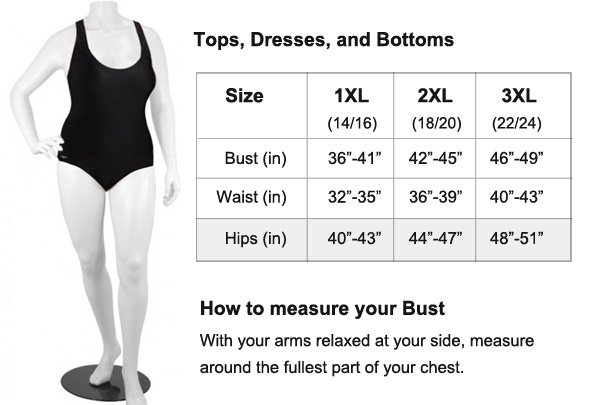
- Bust or chest, waist and hip: the three measurements almost every top, dress and pair of trousers depends on.
- Inseam or length: essential for jeans, trousers and skirts, where two people with the same waist can need very different lengths.
- Units in both inches and centimetres: helpful for shoppers in different countries.
- Region conversion: a column for US, UK and EU numbers if you ship internationally.
- A note on ease: a single line explaining whether the numbers are body measurements or finished garment measurements.
Which Chart Fits Which Product
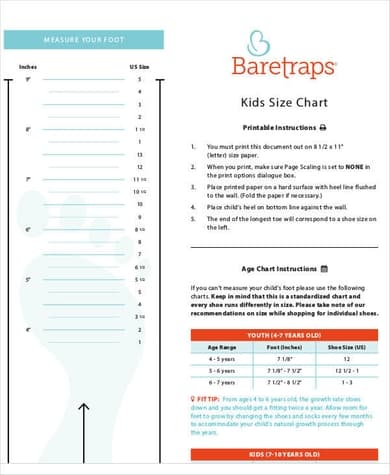
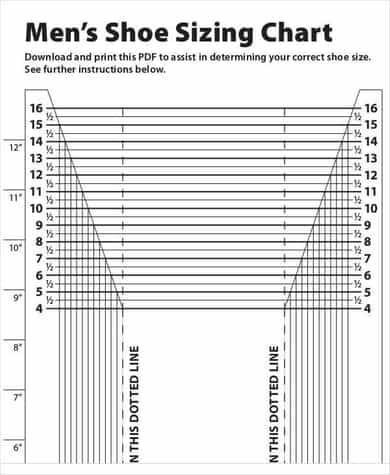
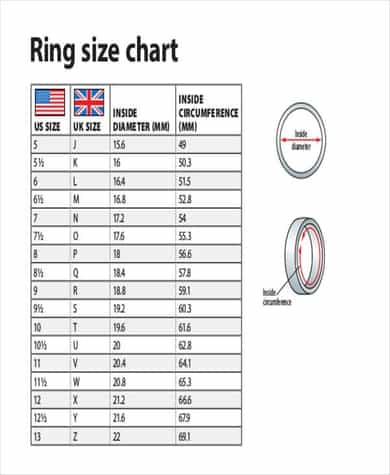
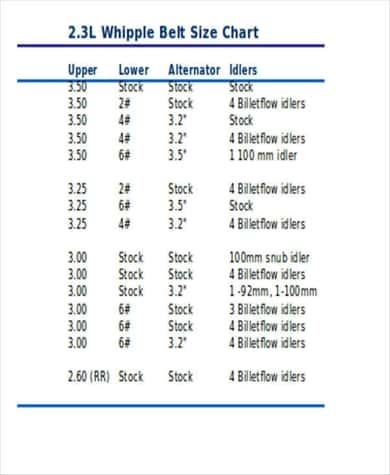
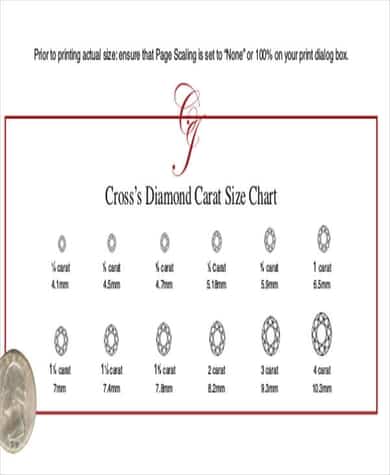
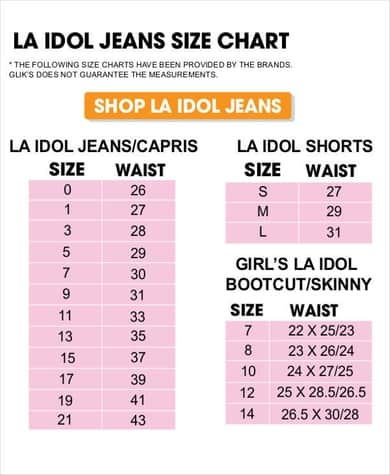
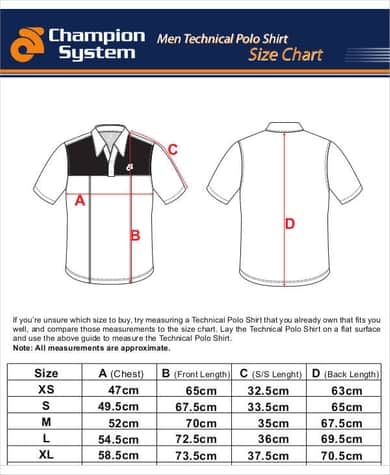
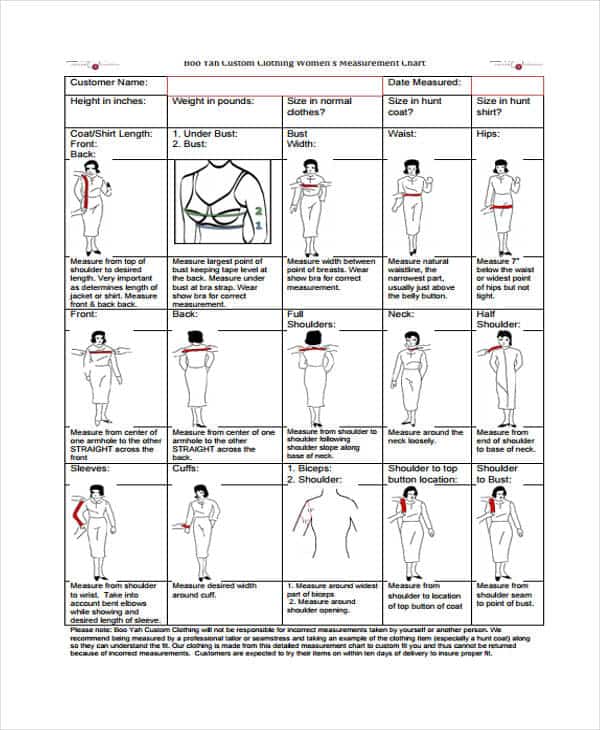
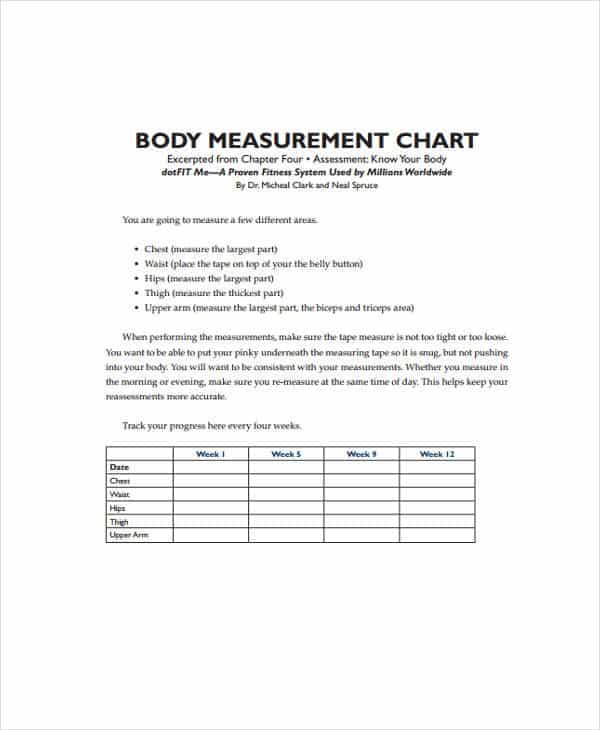
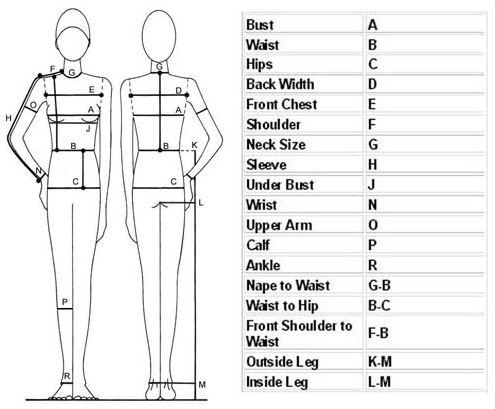
The downloads below are not variations of one table; each targets a different sizing problem. Use the apparel, shirt and jeans charts for garments, the kids’ chart when sizing by age and height, and the shoe chart for foot length. The glove, ring and belt charts are useful for accessory sellers, since those products are measured on the hand, finger or waist rather than the whole body. The diamond size chart is a reference sheet for stone dimensions. Finally, the two body measurement charts show where to place the tape, which makes them handy attachments for made-to-measure orders, tailoring forms or customer guides.
How to Take Accurate Body Measurements
A chart is only as reliable as the measurements behind it. Use a soft tailor’s tape, stand relaxed and keep the tape snug but not tight.
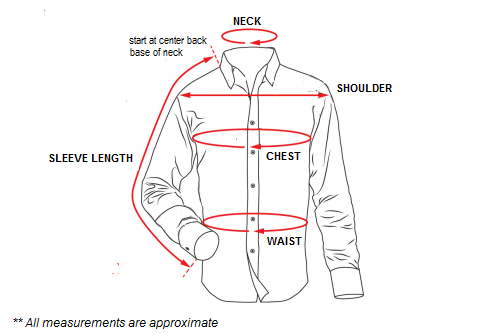
- Chest or bust: around the fullest part, with the tape level across the back.
- Waist: around the natural waistline, the narrowest part of the torso.
- Hips: around the fullest part of the hips and seat.
- Inseam: from the crotch seam down the inner leg to the ankle bone.
- Shoulder and sleeve: shoulder point to shoulder point across the back, then shoulder to wrist with the arm slightly bent.
If a customer falls between two sizes, many sellers suggest the larger size for a relaxed fit and offering alterations for a close fit.
Body Measurements vs Garment Measurements
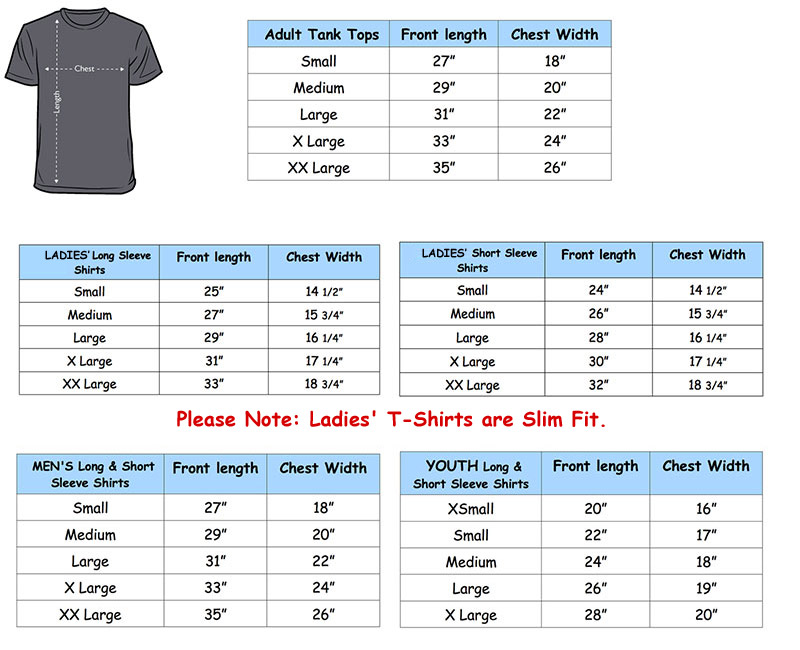
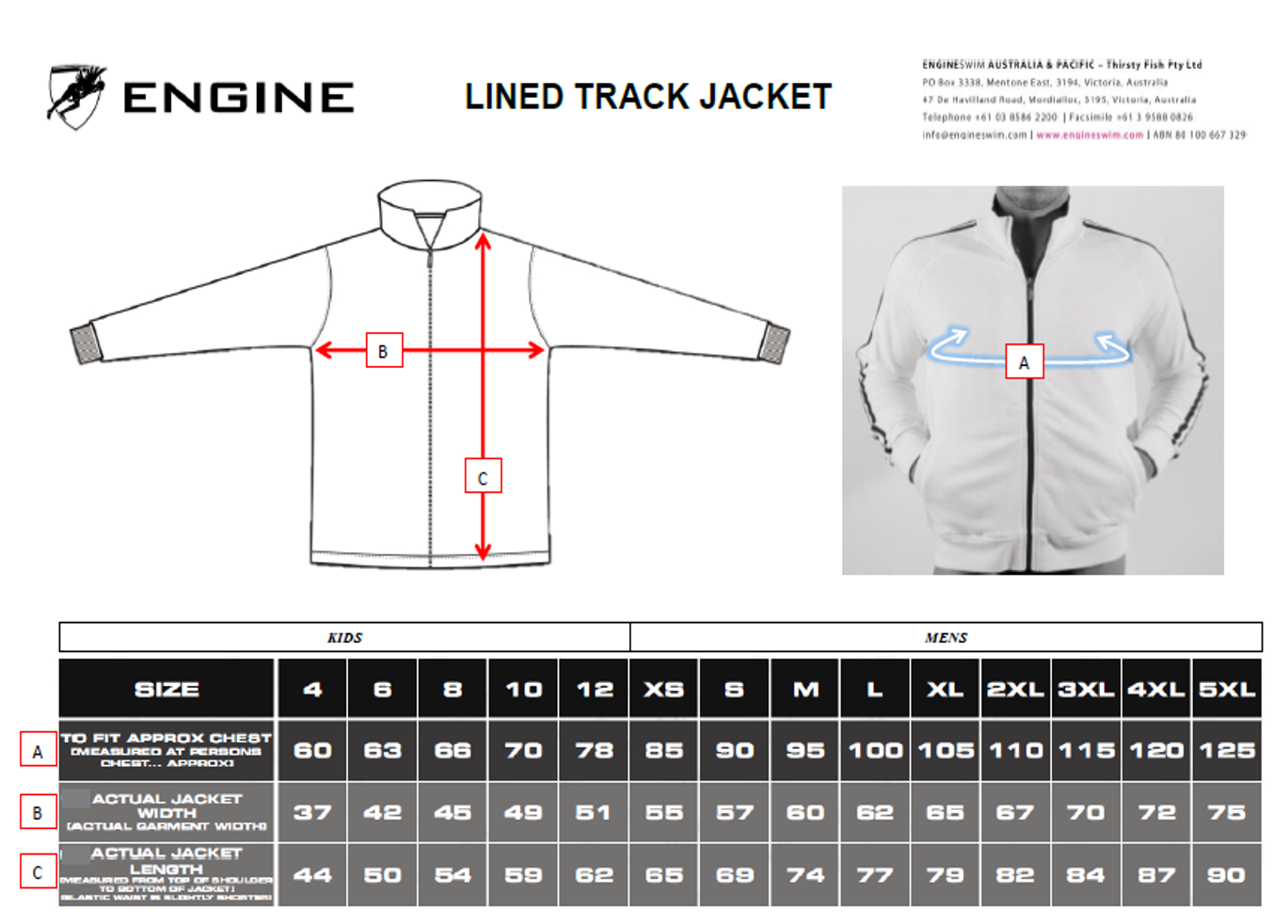
These two are often confused. Body measurements describe the person; garment measurements describe the finished item laid flat, and they include ease so the wearer can move. A shirt with a 40-inch body chest might measure 44 inches around the garment. State which type your table uses. A short sample of wording you can paste under the chart: “Measurements shown are body measurements in inches. Choose your size by your largest measurement. If you are between sizes, order the larger size.” A sample row might read: Size M, chest 38-40 in (96-102 cm), waist 32-34 in (81-86 cm), hip 38-40 in (96-102 cm). Those numbers are illustrative only, so replace them with the data from your own pattern or supplier.
Mistakes to Avoid When Publishing a Size Chart
- Mixing men’s, women’s and children’s measurements in one table, since proportions are not interchangeable.
- Leaving sample numbers from the template in place after you edit the labels.
- Using only S, M and L with no measurements, which gives customers nothing to compare.
- Printing at a reduced scale so that the chart no longer matches its stated dimensions. Print at 100% on A4 or US Letter.
- Forgetting to update the chart when a supplier changes a pattern or a fabric with different stretch.
Using the Downloads
Click a preview to see it at full size, then use the download button beneath it. Some downloads arrive as ZIP files, so extract them first, then open the contents in a program that can edit them. Replace the sample measurements, add your logo and brand colours, and save. Keep an untouched copy of the original file so you can start over if an edit goes wrong, and give each finished chart a clear name such as womens-jeans-size-chart so it is easy to find later. If several people maintain your product pages, agree on one master version to avoid conflicting numbers. Online sellers can export the finished chart as an image or PDF for product pages, while shops and workshops can print it for the fitting area.
Clothing Size Chart Template Downloads


Measurement Charts Only Images:
Related Templates
- free price list templates for pricing each size and style
- printable order form templates for taking made-to-measure requests
- rate card and rate sheet templates for tailoring and alteration fees
- sales report templates for tracking which sizes sell best
Frequently Asked Questions (FAQs) About Clothing Size Charts
How do I find my size using a size chart?
Measure your bust or chest, waist and hips with a soft tape, then match each number to the columns. If the numbers land in different sizes, follow the seller’s advice, which is often to choose the size for your largest measurement.
What is the difference between US, UK and EU sizes?
Each region numbers sizes differently, and the gap varies by brand. A women’s US size 8 often corresponds to a UK 12 and an EU 40, but always check the specific brand’s own chart.
Should I list body measurements or garment measurements?
Body measurements are easier for shoppers to compare with their own numbers. Garment measurements help when the fit is very fitted or oversized. Say clearly which one your chart shows.
How do I make a size chart for my online clothing store?
Pick a template, replace the sample figures with your pattern’s real measurements, show inches and centimetres, and export it as an image or PDF. Link it beside the size selector on each product page.
Which chart should I use for children’s clothing?
Use an age-based chart that also lists height, chest and waist. Children of the same age vary a lot, so height is usually the more dependable guide.
How do I measure ring or belt size for a chart?
For a ring, measure the inner diameter or circumference of a ring that already fits. For a belt, measure the length from the buckle end to the hole that is used most, not the total length of the strap.
Can I edit these templates and print them?
Yes. They are free downloads meant to be customized. Print at 100% scale so the printed measurements stay accurate.
How often should I update my size chart?
Review it whenever you change a supplier, pattern or fabric, and after a spike in size-related returns, which can signal that the chart no longer matches the product.